Apple is interesting not because its pages look polished, but because documentation repeatedly moved inside product design itself. The story begins with engineering notes and ends with Markdown that a coding agent can read.
Method
The study tracks repeatable changes in the role of documentation across archival evidence and current tooling, rather than rating a single website.
50 years of documentation evolution
primary, archival and official sources
archival visual artifacts shown
modern readers: human, IDE, agent
The central finding: Apple never chose between a good interface and good documentation
The neat story says Apple always treated documentation as sacred. The evidence is more useful. Apple developed two ideas in parallel: consumer products should not force people to rescue themselves with a manual, while a developer platform cannot scale without deep, precise and maintained technical documentation. [A19][A21][A5]
Those ideas meet in a recurring pattern. Documentation is strongest at Apple when writing becomes a product test. If a writer cannot explain the behavior consistently, the interface or API may need to change. [A4][A5]
Method and evidence
Snapshot: August 17, 2026. The study prioritizes original manuals, Apple’s internal 1982 newsletter, oral histories of Apple participants, first-person Macintosh accounts, archived HIG material, the Steve Jobs Archive and current Apple/Swift documentation. [A1][A3][A4][A5][A7][A10][A13][A14][A19]
Where a direct quotation or production record is missing, the article says so. In particular, there is no reliable Wozniak manifesto saying “documentation is everything”; his notes and the manuals built from that engineering knowledge are stronger evidence than a fabricated slogan. [A1][A2]
1976–1979: engineering knowledge becomes a shared reference
Apple-1 documentation was close to the needs of a hobbyist audience: operating notes and schematics. Apple II created a new problem. The machine was reaching a broader market while developers still needed to understand memory, video, I/O, ROM and expansion details.
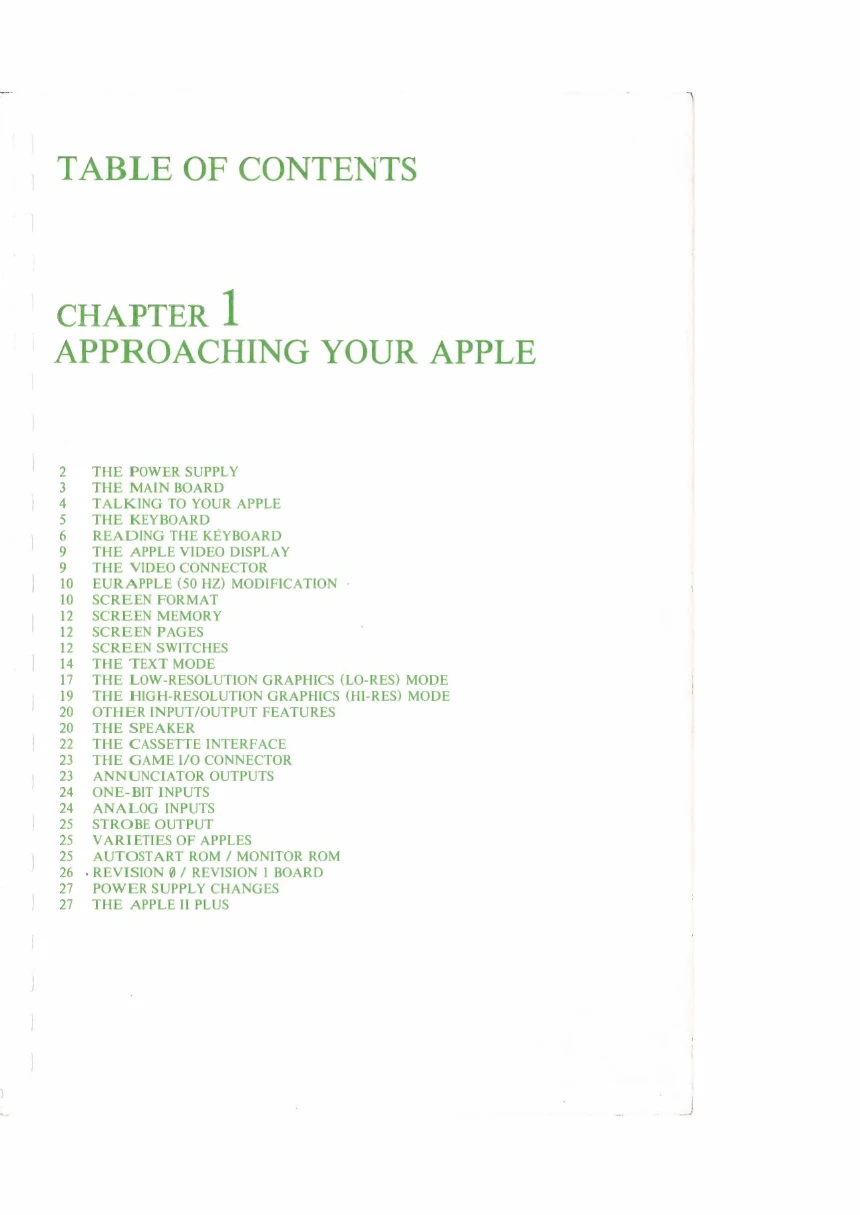
The Woz Wonderbook is a transitional artifact: a compilation of Wozniak’s notes used as early internal documentation and support material. Chris Espinosa’s 1979 Apple II Reference Manual turns that kind of knowledge into a structured publication. [A1][A2]
What the evidence actually says about Wozniak
Wozniak’s contribution is better described through artifacts than through mythology. His engineering notes and detailed explanations made the Apple II legible at a low level. The 1979 reference manual exposes power, boards, screen memory, graphics modes, I/O and ROM rather than hiding the machine behind a thin user layer. [A1][A2]
Publications begins to shape the interface
Chris Espinosa’s oral history links the Publications Style Guide to the origins of Apple interface consistency. Writers needed consistent explanations, and those explanations pushed applications toward consistent behavior. Documentation therefore became a design-governance mechanism, not just downstream prose. [A4]
1982: Apple documents its documentation factory
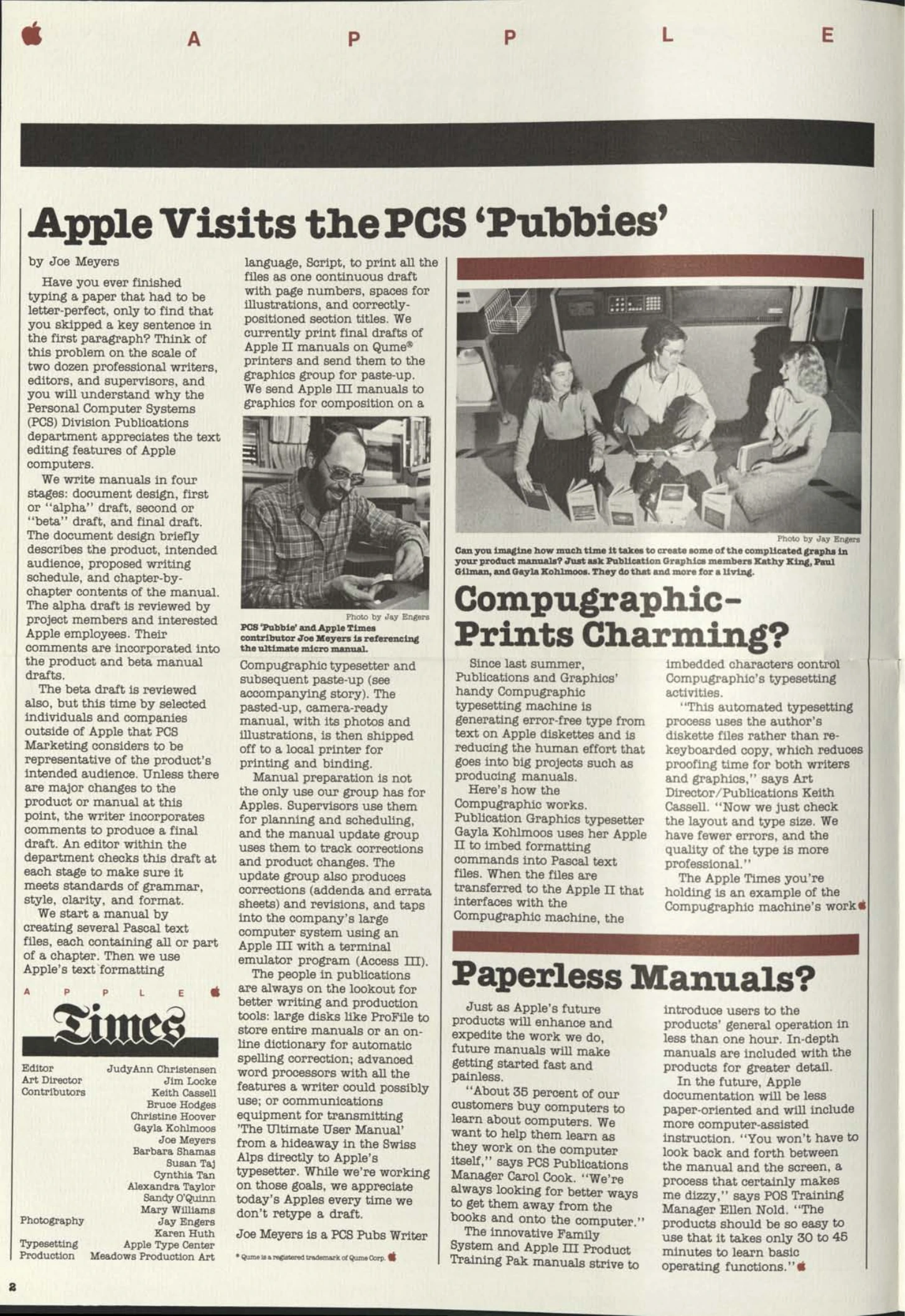
An internal Apple Times story describes four stages: document design, alpha draft, beta draft and final draft. The alpha circulated inside Apple. The beta went to selected external readers representative of the intended audience. Editors checked grammar, style, clarity and format at every stage, while feedback could affect both the manual and the product. [A3]
How the pictures were made: photography, screen dumps, MacPaint and physical paste-up
Apple Times describes authors working in Pascal text files, an internal Script formatting language, Qume printers, Compugraphic typesetting and a graphics group that assembled camera-ready pages by paste-up. Photographs, drawings and typeset copy could therefore have different production paths before meeting on the final board. [A3]
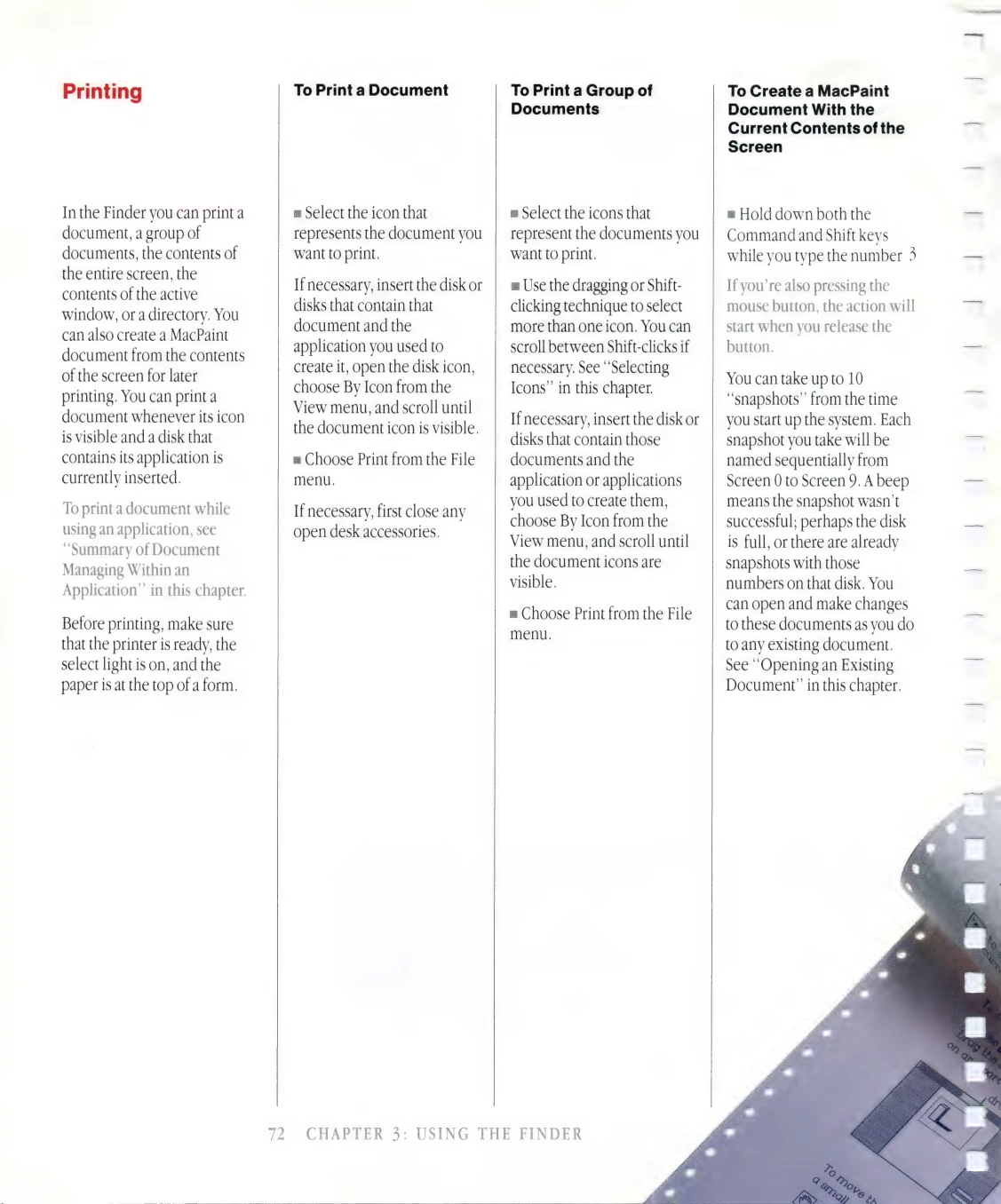
The 1984 Macintosh manual documents Command-Shift-3 as a way to create a MacPaint document from the current screen, up to Screen 0 through Screen 9. That proves digital screen capture was available without pointing a camera at the CRT, although it does not prove every published screenshot used that route. [A7]
The Smithsonian records Susan Kare producing MacPaint drawings for glossy Macintosh manuals. Caroline Rose separately remembers a proposed Inside Macintosh cover being altered with scissors and glue because scanning and Photoshop were not practical options. Digital UI and physical prepress coexisted. [A8][A6]
So what was photographed, and what was drawn?
The archive reveals four distinct production paths that should not be collapsed into the word “screenshot.”
Photography
Hardware, people, staged scenes and photographic material were shot with a camera, then incorporated into camera-ready pages. [A3]
Screen image
The 1984 Macintosh could save current screen contents as a MacPaint document with Command + Shift + 3, so a camera aimed at the CRT was not required. [A7]
Drawing and bitmap art
Susan Kare produced MacPaint drawings for glossy Macintosh manuals. Some manual graphics were native digital artwork, not photographs of a live screen. [A8]
Final page assembly
Text from Script/Qume or Compugraphic met graphics in physical paste-up before the camera-ready page went to the printer. Scissors and glue still appeared in Apple prepress work in 1985. [A3]
“Paperless manuals” before Macintosh
The same 1982 Apple Times page asks about “Paperless Manuals?” Apple publications and training managers describe a future in which basic operation is learned quickly on the computer itself, while deeper manuals remain available for detail. Apple was separating onboarding from reference before the web existed. [A3]
Jobs: the manual is not an excuse for a difficult product
At the Boston Computer Society Macintosh presentation in 1984, Jobs attacked the idea that ordinary people would read “those damn 400-page WordStar manuals.” In a 2007 internal talk he returned to the same point with a phone feature buried on page 93 of an unread manual. Apple’s competence, he argued, was making complex technology easy to use and self-discoverable. [A21][A19]
That position is compatible with the enormous Inside Macintosh reference. A consumer should not need 400 pages to perform ordinary actions. A platform developer needs precise documentation for complexity that genuinely exists. [A5]
Five lines that capture Apple’s documentation evolution
The short original excerpts show how Apple and Macintosh participants framed the problem in their own words.
1982 · Apple Times
“We write manuals in four stages...”
Documentation is already described as a staged production and review process. [A3]
1982 · Apple Times
“get them away from the books and onto the computer”
Publications is already moving first-use learning from the book into the product experience. [A3]
1984 · Macintosh Manual
“To Create a MacPaint Document With the Current Contents of the Screen”
A GUI image can be captured digitally instead of requiring a camera pointed at the CRT. [A7]
1982 · Andy Hertzfeld
“Developer documentation was crucial to our success.”
Inside Macintosh is treated as platform infrastructure, not release collateral. [A5]
1984 · Steve Jobs
“People will not read those damn 400-page WordStar manuals.”
Jobs attacks a product that requires a manual for basic use, not technical writing itself. [A21]
1984: teaching a new interaction language
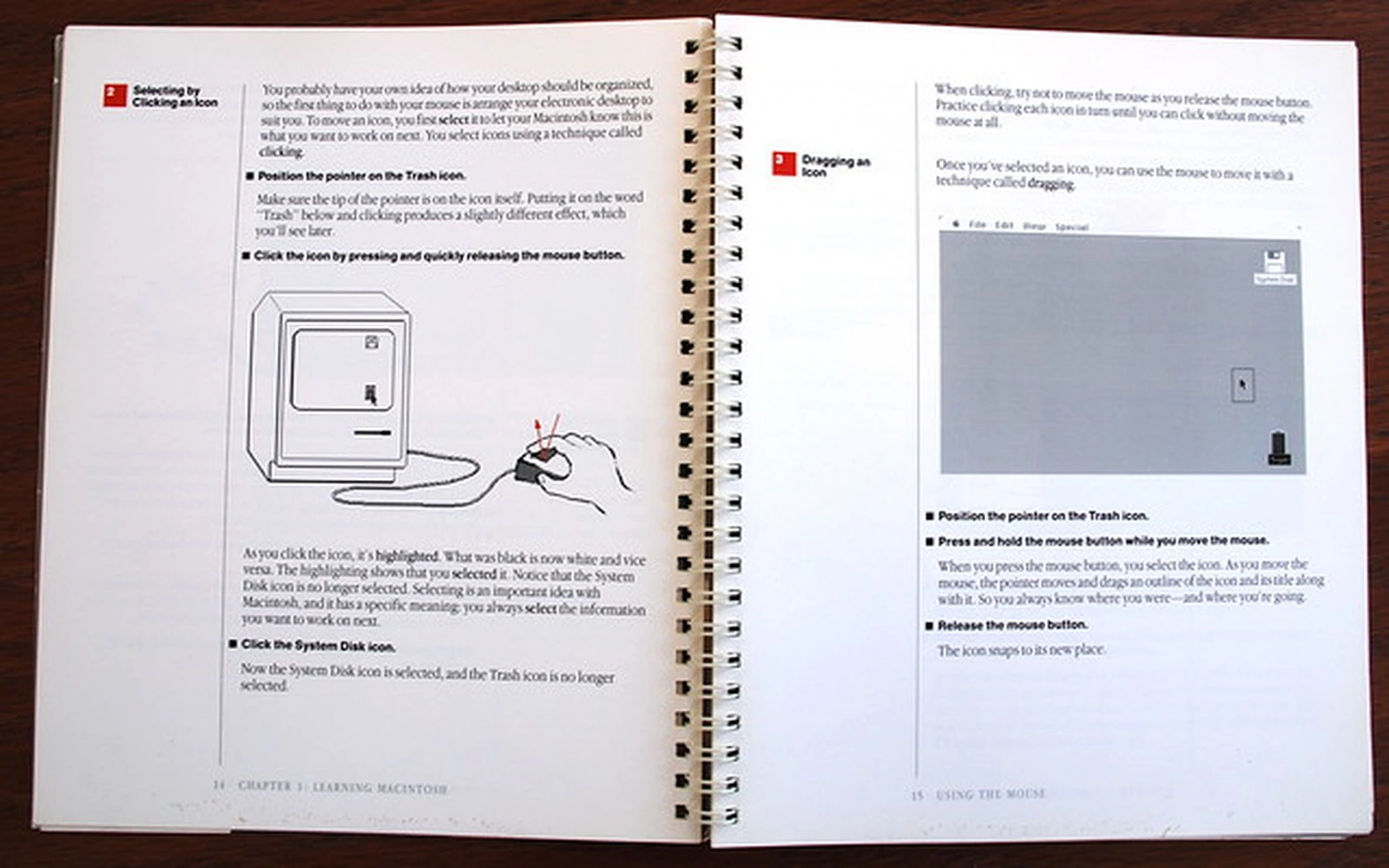
The Macintosh manual had to teach pointer, click, double-click, drag, icons, windows, menus, Clipboard and Trash to readers who could not be assumed to know any of them. Line drawings of a hand and mouse, screen images and guided exercises explain causality rather than decorate the page. [A7]
Inside Macintosh: when a technical writer changes the API
Andy Hertzfeld says developer documentation was crucial to Macintosh success. Technical writer Caroline Rose asked questions so precise that unclear edge behavior became visible. Hertzfeld sometimes changed APIs after her questions and eventually began anticipating them while coding. [A5]
Inside Macintosh grew to roughly a thousand pages across three volumes. Apple distributed an inexpensive “phone book” edition quickly and later a high-production hardback edition. Speed of access and production quality were treated as separate constraints. [A5]
HIG: documentation as ecosystem governance
Human Interface Guidelines do more than describe Apple UI. They create transferable behavior across third-party applications. Oral histories connect this lineage to the Publications Style Guide, and the 1992 HIG explicitly points to the Apple Publications Style Guide for documentation language. [A4][A9][A24]
The June 2026 Apple Style Guide still covers documentation, reference materials, training and user interfaces. The medium changed; the need for a common language did not. [A10]
The Developer Library era
As Apple platforms expanded, documentation became a retrieval problem. The old Developer Library and Xcode Documentation Organizer grouped guides, reference, sample code and other resources by framework, topic and type. Quick Help brought symbol reference into the source editor. [A12]
The archive problem
Apple’s Documentation Archive is a useful record of how strong documentation ages. Retirement was gradual, not a single 2018 shutdown. Revision histories show individual guides moving to the retired library at different dates as successor documentation appeared. [A11][A22][A23]
Preservation and current guidance pull in opposite directions. Removing old docs destroys reproducibility; keeping them without prominent status creates wrong answers. Version, date, retirement status and successor links are therefore part of technical accuracy.
2021: DocC makes documentation a compiled artifact
Swift-DocC combines API comments, long-form Markdown articles and tutorials. Apple built it for internal SDK documentation, integrated it into Xcode 13 and then open sourced the stack. Links and structure can be validated as part of a build instead of living only as editorial convention. [A14][A15]
The design deliberately places documentation closer to code and version control. The production machinery changed from Qume and paste-up to compiler and repository, but the underlying goal is similar: turn tacit engineering knowledge into a reproducible artifact. [A3][A14]
2026: documentation has a third reader — the agent
Current Apple documentation pages expose Markdown versions for automated and assistive tools. Xcode 26.3 gave coding agents the ability to search documentation as part of autonomous work, and Xcode 27 expanded that workflow. Documentation now serves a browser reader, an IDE context and a machine agent. [A13][A16][A17][A18]
What current Apple leadership says
Susan Prescott, Apple’s vice president of Worldwide Developer Relations, publicly frames the goal as giving developers the best tools and technologies and reducing workflow friction. Apple does not usually market documentation as a standalone strategy. Instead, docs, samples, IDE help, diagnostics, tutorials and agent context are embedded in the broader developer experience. [A17][A18]
Editorial continuity
From the Publications Style Guide to the 1992 HIG and the 2026 Apple Style Guide, Apple repeatedly treats terminology as part of product consistency. The modern guide still covers documentation, reference, training and UI copy, showing that editorial governance survived every publishing-platform change. [A4][A9][A10]
What Apple gets right
Apple’s strongest pattern is proximity: writers can influence APIs, HIG influences apps, DocC lives in the build, and Xcode brings reference next to code. The company also keeps distinct content types for onboarding, concepts, reference and examples instead of pretending all documentation is one genre. [A5][A9][A12][A14]
Where the system is weaker
A large symbol reference does not always replace the architectural narrative of older Programming Guides. Archived pages can remain highly searchable long after retirement. And machine-readable documentation can become too fragmentary if authoring is optimized for retrieval at the expense of human explanation. [A11][A13]
What technical writers can borrow
Use writing as a product test. Separate first-success onboarding from deep reference. Standardize product language early. Keep docs inside engineering workflows. Preserve old knowledge with unmistakable status. Design one knowledge model that can serve people, IDEs and agents without maintaining three contradictory corpora. [A5][A10][A11][A14][A17]
What the old pictures teach
Apple’s old pages demonstrate that illustration type should follow the question: schematic for structure, line art for physical action, screenshot for state, HIG diagram for expected behavior. Cheap digital screenshots did not make editorial judgment cheaper; every captured UI still becomes a maintenance commitment. [A1][A7][A9]
Conclusion: the boundary between documentation and product kept shrinking
Apple moved from engineering notes gathered around an individual, through a staged publications department and API-shaping technical writers, to a documentation compiler and agent-readable Markdown. The important change was not paper to HTML. Documentation moved closer and closer to the product lifecycle.
Jobs’s rejection of unread consumer manuals and the thousand-page Inside Macintosh are therefore not opposites. Good products should remove accidental complexity. Good platform documentation should explain the irreducible complexity that remains. [A5][A19][A21]
Research sources
Priority is given to Apple primary material, current official pages, and oral histories from direct participants. Archive copies are used where the original printed item is no longer hosted by Apple.